🚀📅 Day 46 DevOps Challenge - Exploring Ansible Ad-hoc Commands: A Quick and Efficient Automation Tool 🚀

Passionate software engineering student | DevOps enthusiast | Seeking innovation and excellence in software engineering! 👨💻
Welcome back to our Ansible learning journey! Today, we'll dive into understanding ad-hoc commands in Ansible. Ad-hoc commands are one-liners designed to achieve very specific tasks, making them like quick snippets or a compact Swiss army knife when you want to perform quick tasks across multiple machines.
Ansible Ad-hoc Commands vs. Playbooks
To simplify, Ansible ad-hoc commands are analogous to one-liner Linux shell commands, while playbooks are akin to shell scripts—a collection of many commands with logic and structure.
Ad-hoc commands shine when you need to execute a quick task without the need for a more comprehensive playbook.
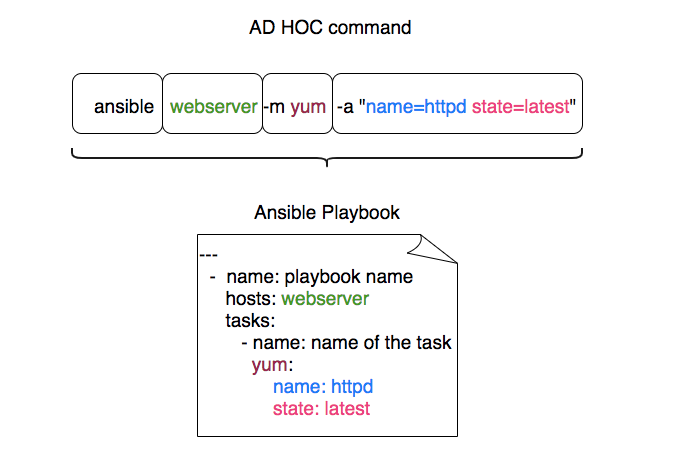
Ansible Playbooks:
Comparable to a well-structured recipe, comprising multiple steps and ingredients.
Suited for orchestrating complex, multistep tasks with conditional logic and error handling.
Ansible Ad-hoc Commands:
Like whipping up a quick snack, requiring minimal ingredients and preparation.
Ideal for rapid, straightforward tasks on the fly.
Task 1: Exploring Ad-hoc Commands
Let's delve into a practical example to understand the efficiency of Ansible ad-hoc commands. For this demonstration, we'll consider a setup with three EC2 instances: one for the Ansible master server and two for the target servers.

Embracing Secure Automation: SSH Key-Based Authentication 🗝️
Before we proceed, let's prioritize security. SSH key-based authentication is a fundamental security measure. We highly recommend setting it up between your control machine and the hosts. This ensures a secure and streamlined authentication process, eliminating the need for credentials for each command or playbook execution. It's akin to having a trusted key to effortlessly open doors.
If you haven't set up SSH key-based authentication yet, there are abundant resources available to guide you through this secure authentication setup. If you need guidance on setting up SSH key-based authentication, you can read about SSH connections or passwordless authentication on my Day-45-blog-about-Ansible for a detailed walkthrough.
With SSH key-based authentication in place, we can now proceed to harness the power and simplicity of Ansible ad-hoc commands for seamless automation! 🚀

Example 1: Pinging Servers 🛰️
Imagine you want to check the connectivity to several servers. The Ansible ad-hoc ping command allows us to achieve this swiftly.
ansible all -i inventory_file -m ping

In this command:
ansible: The Ansible command-line tool.all: Specifies the target hosts (in this case, all hosts defined in the inventory).-i inventory_file: Specifies the inventory file containing the host information.-m ping: Utilizes thepingmodule to ping the hosts.
Replace inventory_file with the actual path to your inventory file.
Example 2: Checking Uptime ⏰
Now, let's consider monitoring the uptime of the servers using an ad-hoc command.
ansible all -i inventory_file -a "uptime"

In this command:
ansible: The Ansible command-line tool.all: Specifies the target hosts (all hosts defined in the inventory).-i inventory_file: Specifies the inventory file containing the host information.-a "uptime": Uses the-aflag to pass the command to the target hosts, executing theuptimecommand.
Example 3: Checking Free Memory Usage 🧠
Monitoring memory usage is crucial for system performance. Here's how you can check the free memory or memory usage of hosts using an Ansible ad-hoc command.
ansible all -i inventory_file -a "free -m"

In this command:
ansible: The Ansible command-line tool.all: Specifies the target hosts (all hosts defined in the inventory).-i inventory_file: Specifies the inventory file containing the host information.-a "free -m": Uses the-aflag to pass thefree -mcommand to the target hosts, displaying memory usage.
For practicing more such commands, you can learn and practice from Ansible_AD_HOC_Command.
Conclusion
Understanding Ansible ad-hoc commands is essential for efficiently managing and automating tasks across multiple machines. They provide a quick and convenient way to perform specific actions without the need for elaborate playbooks. We've covered a simple ping command and checking uptime, showcasing the power and simplicity of Ansible ad-hoc commands. Stay tuned for more Ansible insights and tutorials! 🎉
Stay tuned for more Ansible insights and tutorials! 🎉 Happy automating! 💻


