🚀📅 Day 30 DevOps Challenge - Demystifying Kubernetes Architecture: A Beginner's Guide 🚀

Passionate software engineering student | DevOps enthusiast | Seeking innovation and excellence in software engineering! 👨💻
Kubernetes Overview
🚀 With the widespread adoption of containers among organizations, Kubernetes, the container-centric management software, has become a standard to deploy and operate containerized applications and is one of the most important parts of DevOps.

What is Kubernetes (K8s)?
Kubernetes, often abbreviated as K8s (pronounced "kay-eight-ess"), is an open-source container orchestration platform designed to automate the deployment, scaling, and management of containerized applications. It was originally developed at Google and released as open source in 2014. Kubernetes builds on 15 years of experience running Google's containerized workloads and incorporates valuable contributions from the open-source community.
The name "Kubernetes" is derived from Greek, meaning "helmsman" or "pilot." The abbreviation K8s is formed by replacing the eight letters "ubernete" in the middle of Kubernetes with the number 8. 🎮
Example: Imagine a large e-commerce company that uses Kubernetes to manage its online store. Kubernetes automates the deployment and scaling of containerized applications that handle user traffic, ensuring the website remains responsive even during peak shopping seasons.
Benefits of Using Kubernetes (K8s)
Using Kubernetes offers several key benefits, including:

- Orchestration: Kubernetes automates container deployment, scaling, and management, reducing manual intervention and human errors. 🤖
Example: A popular social media platform uses Kubernetes to handle millions of user requests daily. Kubernetes automatically deploys new instances of its services as traffic surges, ensuring a seamless user experience.
- Scalability: It enables effortless scaling of applications, both horizontally and vertically, to handle varying workloads. ⚙️
Example: A ride-sharing company relies on Kubernetes to scale its driver matching service. As more users request rides during rush hours, Kubernetes dynamically adds more containers to process ride requests.
- High Availability: Kubernetes ensures high availability by distributing containers across multiple nodes and automatically recovering from failures. 🌐
Example: A financial institution utilizes Kubernetes to run its critical trading applications. Kubernetes's high availability features guarantee that trading operations continue uninterrupted, even in the event of hardware failures.
- Portability: Containers deployed on Kubernetes can run consistently across various cloud providers and on-premises infrastructure. 📦
Example: An online media streaming platform employs Kubernetes to run its video encoding services. Kubernetes's portability allows the platform to switch between cloud providers seamlessly, optimizing cost and performance.
- Self-healing: Kubernetes can automatically replace failed containers or nodes, ensuring application reliability. 🛠️
Example: A healthcare organization uses Kubernetes to manage its patient records system. Kubernetes detects and replaces containers with corrupted data, maintaining the integrity of medical records.
- Resource Efficiency: It optimizes resource utilization by packing containers efficiently on nodes. 💡
Example: A research institution employs Kubernetes for its scientific simulations. Kubernetes efficiently allocates computing resources, allowing researchers to run complex simulations cost-effectively.
- Rolling Updates: Kubernetes supports rolling updates, allowing for seamless application upgrades without downtime. 🔄
Example: An e-commerce platform uses Kubernetes to update its shopping cart service. Kubernetes rolls out updates gradually, ensuring that customers can continue shopping without disruptions.
Kubernetes Architecture 🏗️
Kubernetes architecture is a crucial aspect of understanding how this container orchestration platform manages containerized applications. The architecture is divided into two main components: the Master Node (Control Plane) and Worker Nodes. These components work together seamlessly to ensure the reliable and scalable operation of containerized workloads.
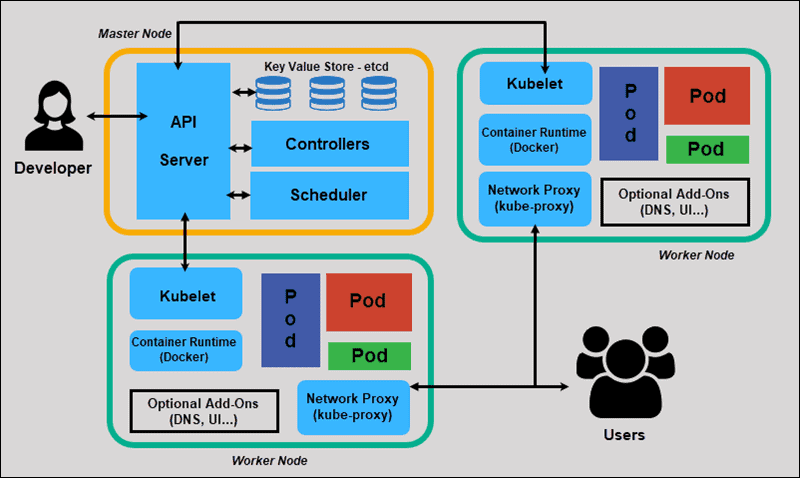
Master Node (Control Plane) 🧠
The Master Node, often referred to as the Control Plane, is the brain behind Kubernetes. It takes care of managing the overall state and operations of the cluster. This critical component is composed of several key elements:
API Server 🌐
Centralized Communication Hub: The API Server acts as the central control point for all interactions within the cluster.
User-Friendly Interface: It exposes the Kubernetes API, allowing users, components, and tools like kubectl to communicate with the cluster.
Security and Validation: The API Server handles authentication, authorization, and validation of API requests, ensuring secure and compliant cluster operations.
etcd 🗄️
Cluster Database: etcd serves as the distributed key-value store that functions as the cluster's database.
Configuration Repository: It stores all configuration data related to the cluster, ensuring data consistency and high availability.
Critical Data Storage: etcd is used to save cluster configurations, state information, and other essential data that Kubernetes relies on.
Scheduler 📊
Intelligent Workload Distribution: The Scheduler is responsible for ensuring that Pods (the smallest deployable units) are assigned to suitable Worker Nodes.
Resource Optimization: It takes into account factors such as resource requirements, affinity and anti-affinity rules, and workload balance to optimize the distribution of Pods across the cluster.
Automatic Load Balancing: The Scheduler plays a crucial role in balancing the workload across Worker Nodes for efficient resource utilization.
Controller Manager 🕹️
Resource State Maintenance: The Controller Manager manages various controller processes that help regulate the state of the cluster.
Detecting Changes: It constantly monitors the cluster for changes, such as scaling applications, ensuring that the desired state is maintained, and initiating necessary updates as needed.
Worker Nodes 🏢
Worker Nodes are where the actual containerized workloads run. Each Worker Node is managed by the Master Node and plays a pivotal role in executing and managing containerized applications. The key components on a Worker Node include:
Kubelet 🤖
Node's Guardian: Kubelet serves as the agent responsible for overseeing activities on each Worker Node.
Pod Management: It ensures that containers are running within Pods, adhering to the specifications defined in their PodManifests.
Communication Bridge: Kubelet communicates directly with the API Server, receiving instructions, updates, and information regarding Pod deployments.
Kube Proxy 🌐
Network Management: Kube Proxy is responsible for maintaining network rules on nodes, facilitating network communication to and from Pods.
Load Balancing: It handles load balancing of traffic between Pods to ensure optimal routing.
Service Accessibility: Kube Proxy ensures that services within the cluster are accessible and reliably reachable.
Container Runtime 📦
Container Execution: This component is responsible for running containers within Pods.
Choice of Runtimes: Kubernetes supports various container runtimes, such as Docker, containerd, and others.
Container Lifecycle: The container runtime executes and manages the lifecycle of container processes within Pods.
Pod 🏁
Pod as the Smallest Unit: A Pod is the smallest deployable unit in Kubernetes and represents a single instance of a running process in the cluster.
Containers within Pods: Pods can contain one or more containers that share the same network and storage resources.
Co-Located Units: Containers within a Pod are scheduled on the same Worker Node and can communicate with each other using localhost.
Interaction Between Master and Worker Nodes 🤝
The collaboration between the Master Node (Control Plane) and Worker Nodes is essential for the proper functioning of the Kubernetes cluster:
User and Administrator Interaction: Users and administrators communicate with the Kubernetes cluster through the API Server, using tools like kubectl to manage cluster resources.
Workload Distribution: The Scheduler on the Master Node intelligently assigns Pods to specific Worker Nodes, taking into account various factors to ensure optimal resource allocation.
Cluster State Monitoring: The Controller Manager continuously monitors the cluster's state and ensures that the desired state, as defined in workload configurations, is maintained.
Node-Level Operations: Kubelet on each Worker Node communicates with the API Server to receive deployment instructions and monitor the health of containers and Pods.
Network and Service Management: Kube Proxy on Worker Nodes manages network rules, load balancing, and service accessibility, facilitating communication within the cluster.
In summary, the Kubernetes architecture is structured around the Master Node (Control Plane) and Worker Nodes, with each component playing a distinct role in orchestrating and managing containerized applications within the cluster. This separation of responsibilities contributes to the scalability, reliability, and efficiency of Kubernetes as a container orchestration platform. 🚀🌟
Difference Between kubectl and Kubelet 🛠️🤖
In the Kubernetes ecosystem, both kubectl and Kubelet are essential components, but they serve different purposes and are used by different roles within the cluster management process. Here's a breakdown of the key differences between kubectl and Kubelet:
kubectl 🛠️
Role:
- User and Administrator Tool:
kubectlis primarily a command-line tool used by users, administrators, and developers to interact with the Kubernetes cluster.
Functionality:
- Cluster Management:
kubectlenables users to manage the entire Kubernetes cluster and its resources. It provides a command-line interface for performing various actions on the cluster, such as deploying applications, scaling, monitoring, and troubleshooting.
Capabilities:
Resource Manipulation:
kubectlallows users to create, inspect, update, and delete Kubernetes resources, including Pods, Services, Deployments, ConfigMaps, and more.Cluster Configuration: It facilitates the configuration of contexts, clusters, and user authentication settings, making it versatile for multi-cluster and multi-user scenarios.
Troubleshooting and Debugging: Users can use
kubectlto inspect the status of resources, retrieve logs, and perform debugging tasks within the cluster.
Examples:
Deployment: Developers use
kubectlto deploy their applications to the cluster, defining how the application should run and how many replicas should be created.Scaling: Administrators can use
kubectlto scale applications horizontally or vertically based on workload requirements.Logs Retrieval: When troubleshooting, users can fetch container logs using
kubectl logsto diagnose issues within Pods.
Kubelet 🤖
Role:
- Node Agent: Kubelet is an agent that runs on each Worker Node within the Kubernetes cluster. It acts as the node-level supervisor responsible for managing containers and Pods on that node.
Functionality:
- Pod Execution: Kubelet is responsible for ensuring that containers specified within Pods are running and healthy on its associated Worker Node. It receives instructions from the Control Plane (Master Node) and acts accordingly.
Capabilities:
Pod Lifecycle: Kubelet manages the complete lifecycle of Pods, from pulling container images to starting, stopping, and restarting containers. It ensures that the containers within Pods are running as expected.
Health Checks: Kubelet regularly performs health checks on containers and reports their status to the Control Plane.
Resource Isolation: It enforces resource isolation for Pods, ensuring that they receive the allocated CPU and memory resources.
Examples:
Container Execution: Kubelet executes and manages the container processes within Pods on the Worker Node, adhering to the instructions received from the Control Plane.
Node Health Reporting: Kubelet continuously reports the health of the node and the containers it manages to the Control Plane, enabling proactive monitoring and response to issues.

Summary
In summary, kubectl is a versatile command-line tool used for managing and interacting with the Kubernetes cluster from a user or administrator perspective. It provides a comprehensive set of commands for deploying, scaling, monitoring, and troubleshooting applications.
On the other hand, Kubelet is an agent running on each Worker Node, acting as the node-level supervisor responsible for executing and managing containers and Pods on that node. It takes instructions from the Control Plane and ensures the proper execution and health of containers.
While both are vital components in Kubernetes, they serve different roles, with kubectl being a user-facing tool for cluster management, and Kubelet serving as the node-level executor and supervisor for containerized workloads.
Role of the API Server 🌐
The API Server is a central and critical component within the Kubernetes architecture, serving as the primary entry point for interactions with the Kubernetes cluster. Its role is multifaceted and essential for the proper functioning of the cluster. Here, we delve into the pivotal role of the API Server:
Centralized Communication Hub 📡
Interaction Gateway: The API Server acts as a centralized communication hub, providing a single point of access for all interactions with the Kubernetes cluster. It serves as the entry point for all Kubernetes-related requests.
User and Tool Interface: Users, administrators, and various Kubernetes components interact with the cluster through the API Server. This includes using tools like
kubectl, dashboard interfaces, and automation scripts.
User-Friendly Interface 🤝
Exposed Kubernetes API: The API Server exposes the Kubernetes API, which is designed to be user-friendly and intuitive. This API allows users to manage and control various aspects of the cluster's resources, including Pods, Services, Deployments, ConfigMaps, and more.
Uniformity: The API Server ensures that users and tools interact with the cluster using a standardized interface, simplifying cluster management and reducing complexity.
Security and Validation 🔒
Authentication: It handles authentication, ensuring that users and components making requests to the API are who they claim to be. Kubernetes supports various authentication methods, including client certificates, bearer tokens, and more.
Authorization: The API Server enforces authorization policies, determining what actions users and components are allowed to perform within the cluster. This role is crucial for maintaining security and access control.
Request Validation: All incoming API requests are validated by the API Server, ensuring that they adhere to the Kubernetes schema and are syntactically correct.
Cluster State Management 🗄️
State Repository: The API Server communicates with the etcd database, serving as a bridge between users/components and the cluster's state. It stores and retrieves configuration data, resource specifications, and the current state of the cluster.
Data Consistency: It plays a pivotal role in maintaining the consistency of the cluster's data. Any changes made to the cluster's state must go through the API Server, ensuring that data remains accurate and synchronized across the cluster.
Interaction with Kubernetes Components 🔄
Component Coordination: The API Server serves as the central coordination point for various Kubernetes components, including the Scheduler, Controller Manager, and Kubelet. These components communicate with the API Server to retrieve information about the cluster's desired state and to update the actual state.
Resource Management: Users and automated processes create, modify, and delete resources (such as Pods and Services) by sending requests to the API Server. The API Server processes these requests, updating the cluster's state accordingly.

Summary
In essence, the API Server in Kubernetes is the heart of cluster management. It provides a unified, secure, and user-friendly interface for interacting with the cluster, ensuring that all operations are performed within the bounds of authentication, authorization, and validation rules. As the primary gatekeeper, the API Server plays a crucial role in maintaining the integrity and reliability of Kubernetes clusters, making it a core component in the orchestration of containerized applications.
Conclusion
In summary, Kubernetes, often referred to as K8s, is a powerful container orchestration platform with numerous benefits. Real-world examples demonstrate how organizations leverage Kubernetes to address scalability, high availability, and efficient resource utilization, among other challenges. The Control Plane and its components, along with tools like kubectl and Kubelet, play pivotal roles in managing and orchestrating containerized applications. 🚢🌟


